Migrating production applications from traditional virtual machines to container platforms is a major architectural milestone for any SaaS engineering team. While containers offer faster provisioning, predictable runtime isolation, and simpler scaling, moving legacy workloads without a careful strategy can introduce unexpected downtime and operational friction. This article outlines a methodical approach to transitioning from virtual machines to containers while minimizing risk.
Auditing Dependencies and Runtime Assumptions
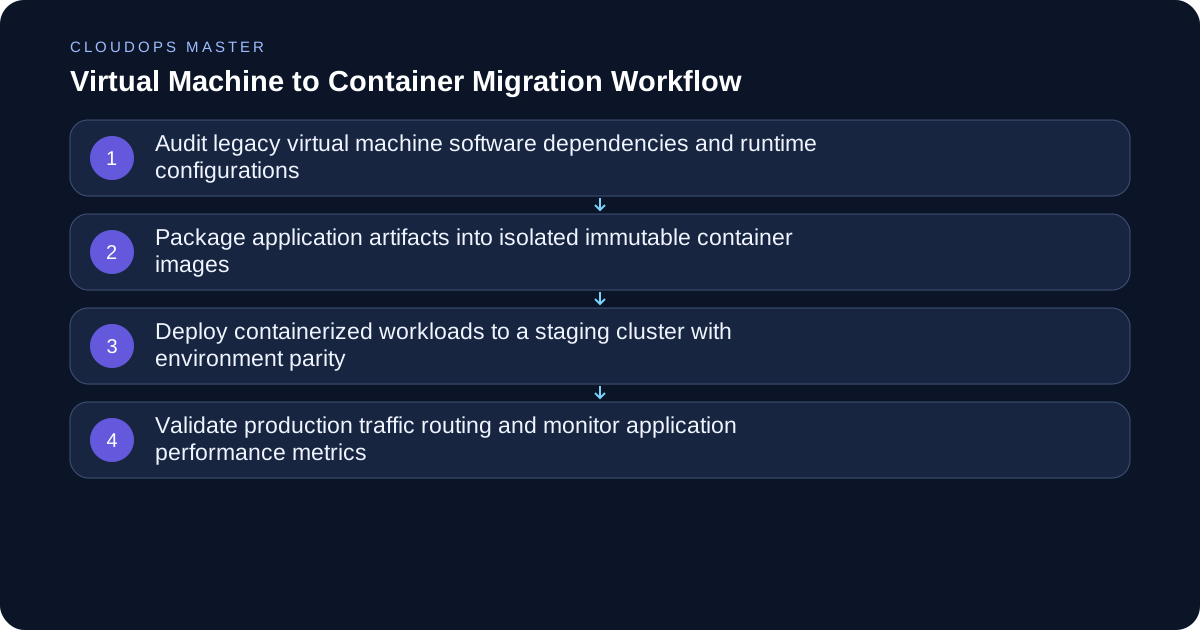
Before writing a single containerfile, you must inventory the exact runtime assumptions of your legacy virtual machine workloads. Virtual machines often hide configuration drift, manual package installations, and implicit file system dependencies that break inside immutable containers. Begin by examining your configuration management tools, startup scripts, and systemd service definitions. Document every environment variable, persistent storage path, and external network dependency required by the application.
Tradeoffs emerge when dealing with stateful legacy dependencies. If a monolithic application relies heavily on local file system writes or hardcoded IP addresses, containerizing it directly will fail. Teams must decide whether to refactor the application to use object storage and environment-based configuration before containerization, or tackle those architectural debts concurrently within a staging environment.
Containerizing the Application Artifacts
Once the runtime requirements are documented, translate them into a secure, minimal container image. Avoid using bloated base images that include unnecessary debugging utilities, package managers, or shell interpreters, as these expand your software supply chain attack surface. Multi-stage builds help separate your compilation environment from the lean production runtime, ensuring that only necessary binaries are shipped.
When writing your build definitions, pin base image digests rather than mutable tags to guarantee deterministic builds. Handle process management carefully; standard container runtimes expect the main application process to run as PID 1 and forward POSIX signals correctly. If your legacy runtime relies on multi-process supervision tools, adopt an appropriate init system designed for containers rather than attempting to replicate a full virtual machine inside a single container.
Managing Configuration and Persistent Data
Containers are designed to be ephemeral, which conflicts directly with traditional virtual machine storage models. In a virtual machine, configuration files and logs often reside directly on local disks. For containers, all configuration must be injected externally through environment variables, mounted secrets, or configuration maps, while application logs should stream directly to stdout and stderr for centralized ingestion.
Persistent data requires careful planning regarding volume lifecycles and storage classes. Database engines, local caches, and file upload directories cannot live inside the ephemeral container layer. Map external managed storage or persistent volume claims explicitly, and test failure scenarios where a container crashes and restarts on a different host node to ensure data integrity is maintained.
Establishing Parity in Staging Environments
Never promote containerized workloads directly from a developer workstation to production. You need a dedicated staging cluster that mirrors your target production environment in terms of networking policies, DNS resolution, secret management, and ingress routing. Run integration test suites against this staging environment to catch subtle regressions in performance, memory limits, or CPU throttling.
Pay close attention to resource requests and limits. Virtual machines often run with generous, unconstrained resource allocations, whereas containers require explicit boundaries to prevent resource starvation or noisy neighbor effects. Analyze historical metrics from your legacy virtual machines to set realistic CPU and memory requests that prevent out-of-memory kills during traffic spikes.
Traffic Cutover and Rollback Strategies
When you are confident in your staging validation, plan a gradual traffic cutover rather than a sudden big-bang migration. Use DNS weighting, load balancer target groups, or service mesh routing to shift a small percentage of production traffic to the new containerized deployment. Monitor error rates, latency percentiles, and saturation metrics closely before increasing the traffic share.
Maintain an active fallback path to your legacy virtual machines throughout the cutover window. If critical regressions occur, your team must be able to revert the routing configuration instantly. Keep the legacy virtual machines running in a warm standby state for a defined observation period before decommissioning them.
Low-Risk Migration Checklist
- Inventory all legacy configuration files, cron jobs, and systemd services.
- Build minimal, multi-stage container images with pinned digests.
- Externalize all runtime secrets and configuration parameters.
- Stream application logs to standard output for centralized collection.
- Configure explicit CPU and memory resource requests and limits.
- Set up a staging cluster mirroring production network policies.
- Implement gradual traffic shifting using load balancer routing.
- Maintain warm standby virtual machines for rapid emergency rollbacks.
Conclusion
Transitioning from virtual machines to containers is fundamentally an exercise in operational discipline rather than simple code packaging. By thoroughly auditing legacy dependencies, externalizing configuration, establishing strict resource boundaries, and executing gradual traffic cutovers, engineering teams can modernize their infrastructure without risking customer trust or system reliability.