The community Ingress NGINX project announced retirement for March 2026, with no further releases or security fixes after retirement. For teams still running it, migration is an operational priority. This concerns the community controller, not every product with NGINX in its name, and does not mean the Kubernetes Ingress API has disappeared. See the official retirement announcement.
The practical challenge is preserving application behavior while replacing the component that receives production traffic. Treat the work as a traffic migration with acceptance tests, ownership, and a recovery path.
Start with behavior, not YAML
Build an inventory of hostnames, certificates, ingress classes, backend services, and annotations. Assign an application owner to each route. Pay particular attention to authentication, rewrites, regular expressions, request size limits, timeouts, and source IP handling.
A useful migration worksheet records the existing behavior, the proposed replacement, a test request, and the expected response. For example, an upload endpoint should retain its accepted payload size and timeout; a private endpoint should still reject an unauthenticated request.
Ingress NGINX has controller-specific matching behavior that can surprise teams during migration. Review the Kubernetes article on migration edge cases before assuming a translated manifest is equivalent.
Separate platform and application responsibilities
Gateway API introduces resources for different responsibilities. The platform team selects a controller and GatewayClass, manages listeners and TLS, and defines which routes may attach. Application teams manage HTTPRoute resources that select hostnames, paths, and backends. A controller must implement these resources; installing CRDs alone does not create a working proxy.
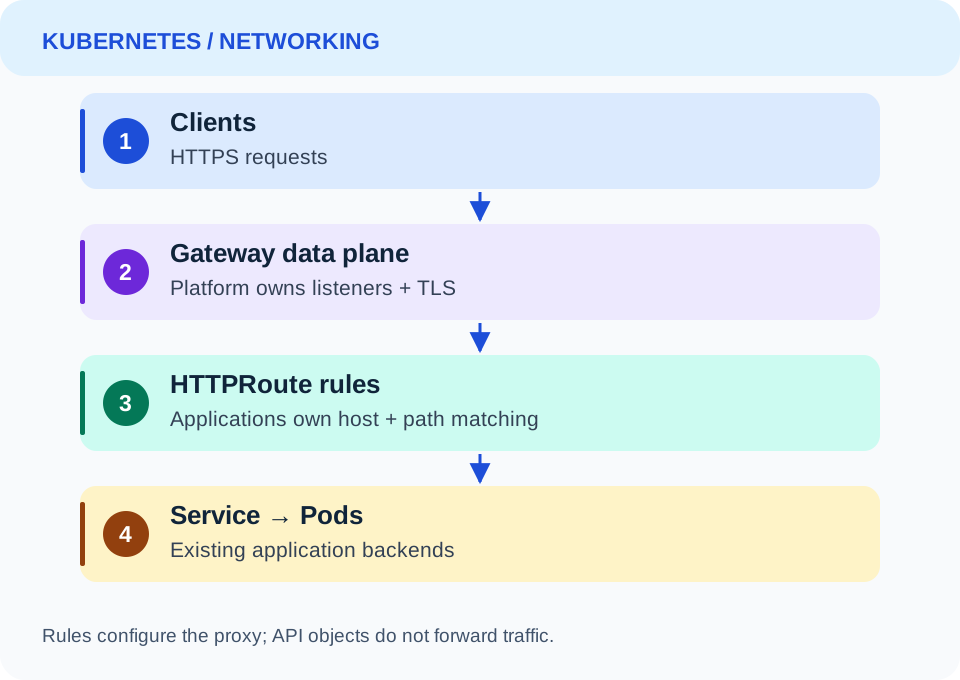
The diagram separates ownership from request flow. Gateway and HTTPRoute are configuration resources; requests pass through the controller's data plane rather than through Kubernetes API objects.
Make one route work first
This HTTPRoute assumes Gateway API CRDs and a compatible controller are installed, an edge Gateway exists in the same namespace, and its listener permits the route. The catalog Service must expose port 8080. Configure the Gateway's HTTPS listener and certificate separately before using it publicly.
apiVersion: gateway.networking.k8s.io/v1
kind: HTTPRoute
metadata:
  name: catalog
  namespace: storefront
spec:
  parentRefs:
    - name: edge
  hostnames:
    - shop.example.com
  rules:
    - matches:
        - path:
            type: PathPrefix
            value: /catalog
      backendRefs:
        - name: catalog
          port: 8080
This matches the /catalog prefix; it does not strip that prefix. If the backend expects /, add and test an explicitly supported rewrite. The HTTP routing guide explains parent references and backend routing.
Test the new endpoint before changing DNS
Deploy the new controller beside the old one with a separate load balancer address. Send requests directly to the new address while preserving hostname and TLS server name:
curl --resolve shop.example.com:443:203.0.113.10 \
  https://shop.example.com/catalog
Replace the example address with the new endpoint. Exercise redirects, authentication failures, missing paths, uploads, and any WebSocket or gRPC traffic. Check route status for Accepted and ResolvedRefs, then verify real responses; accepted configuration alone does not prove the application works.
Cut over with measurable exit criteria
Before changing traffic, agree on acceptable error rate and latency relative to the current baseline. Lower DNS TTL ahead of the change, where applicable, and remember that existing connections and caches can outlive the cutover.
Move a low-risk hostname first. Compare request counts, TLS failures, upstream errors, and application latency. Keep the old path available for a bounded rollback window, then remove it once traffic has drained and acceptance checks pass. A retired controller should not become a permanent fallback.
The migration is finished when every hostname has an owner, the new path passes behavior tests, dashboards cover the new controller, and the old deployment and unnecessary permissions are removed.