A deployment workflow can build your software, publish packages, and change production. Its identity and inputs deserve the same attention as the application itself. A useful modernization combines short-lived cloud access with a verifiable connection between source, build, and deployed artifact.
There is also a concrete 2026 detail to review: GitHub documents a new default OIDC subject format for repositories created after July 15, 2026, incorporating immutable owner and repository IDs. This is not available on GitHub Enterprise Server. Do not copy an older trust-policy subject without checking the format your repository actually uses. See the OIDC documentation.
Replace stored cloud keys with narrowly scoped trust
With OIDC, a job obtains a GitHub identity token and exchanges it with a cloud provider for temporary credentials. The cloud trust policy decides which identities may assume a role; the role's permissions decide what they may do.
Restrict the expected issuer, audience, and supported identity claims to the intended repository and deployment context. If your subject uses an environment, configure that environment's branch restrictions and protection rules too. OIDC removes a stored credential but does not make an overpowered role safe.
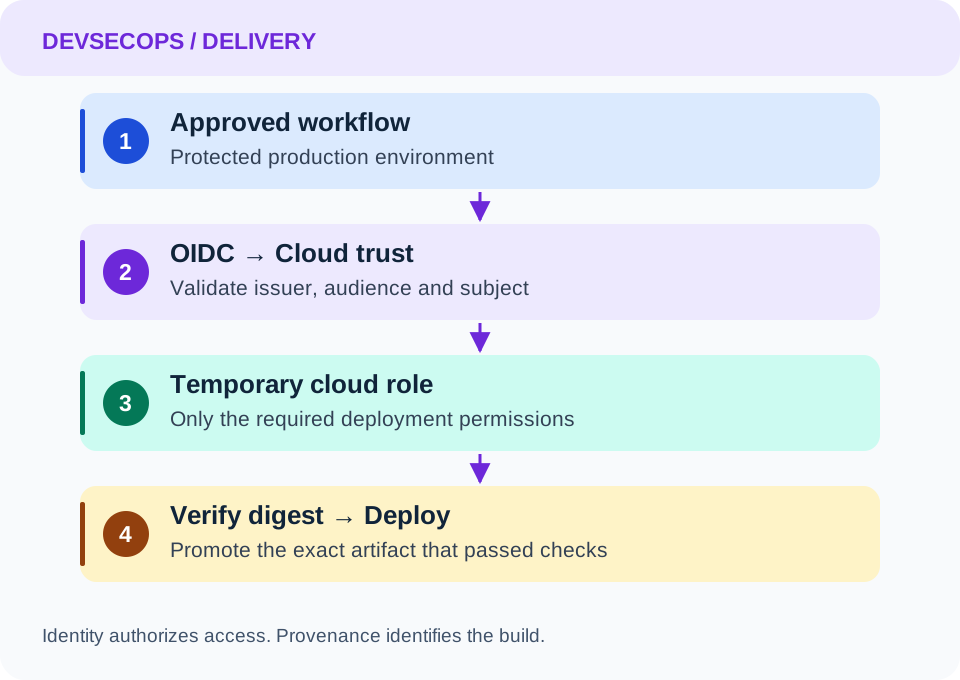
Keep cloud permissions in the deploy job
Use read-only repository permissions by default and grant token issuance only to the job that needs it. The following fragment shows the job boundary, not a complete deployment workflow:
permissions:
  contents: read

jobs:
  deploy:
    runs-on: ubuntu-latest
    environment: production
    permissions:
      contents: read
      id-token: write
    steps:
      - name: Deployment prerequisites
        run: echo "Configure provider login and artifact verification here"
Add your cloud provider's documented login action, pinned to a reviewed full commit SHA, and configure the matching trust policy before enabling deployment. id-token: write allows requesting an identity token; it does not itself grant access to cloud resources.
Keep untrusted pull request builds outside this privileged job. Do not execute pull request code in a privileged workflow merely because its trigger or workflow file comes from the default branch.
Make the build output identifiable
Build once and record the artifact digest. Generate provenance for that output in the trusted build workflow, then promote the same digest through staging and production. Rebuilding after approval creates a different output and breaks the connection between what passed tests and what is deployed.
GitHub artifact attestations can associate an artifact with its build origin. Their availability depends on repository visibility and plan; check the attestation guide before adding them to a required deployment gate.
For a downloaded binary with an attestation, a verification step can look like:
gh attestation verify ./dist/service --repo YOUR_ORG/YOUR_REPO
Replace the repository and artifact path. Run verification in a trusted job and fail deployment on verification errors. Define which repository and workflow are acceptable, and ensure the deployed bytes are the verified bytes. Provenance establishes origin; it does not prove that software is free of vulnerabilities.
Protect the workflow's other inputs
Pin third-party actions to full commit SHAs and use dependency update automation to review changes. Treat branch names and PR titles as untrusted data: pass them through environment variables instead of interpolating expressions into executable shell code. These controls are described in GitHub's secure use reference.
For self-hosted runners, prefer isolated, disposable workers for sensitive jobs. A persistent runner that previously executed untrusted code is a poor place to introduce production credentials, even temporary ones.
Prove the boundary works
Test both success and refusal. A permitted release should obtain the narrow deployment role. An unapproved branch, unrelated repository, or job outside the expected environment should fail. A modified artifact should fail verification.
Record the artifact digest, source commit, workflow run, target environment, and approver with each deployment. For rollback, retain a previously verified artifact and deploy that exact version through the same controlled path. This turns a security configuration into an auditable release process.